 |
| The kids scanned and 3D-printed |
 |
| Adapter to connect a Xbox Kinect to a PC |
 |
| Self portrait |
|
| The kids scanned and 3D-printed |
|
| Adapter to connect a Xbox Kinect to a PC |
|
| Self portrait |


 |
| Chain that always failed to print until I found the retraction option 'lift Z' |
 |
| Printer and spool holder |
 |
| Left blown by mouth, middle with small 40 mm fan, on the right with big fan mounted in the printer frame |
 |
| A fan is mounted on the printer frame using tie-wraps |
 |
| Exclamation mark in netfabb |
 |
| STL file cut on X axis |
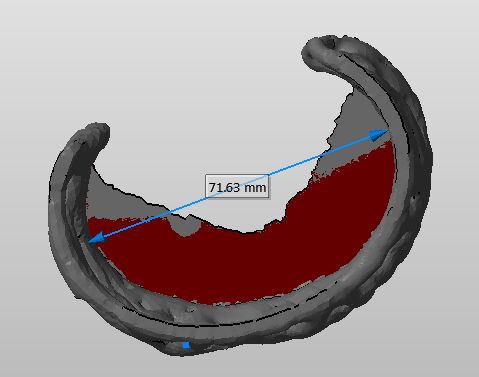 Another feature that I find convenient, is the measure tool in netfabb. It allows you to measure an object in the STL file. I have used it to scale a bangle down to fit the wrist of my nine year old daughter. To make a measurement click 'Extras/New Measuring' from the menu. Now click on two points in the model to create a line showing the distance. Use the mouse as described to rotate and zoom the model while placing the measure points.
 |
| Part left Slic3r 0.7.1, part right Slic3r 0.9.8 |
 |
| Part left Slic3r 0.7.1, part right Slic3r 0.9.8 |
